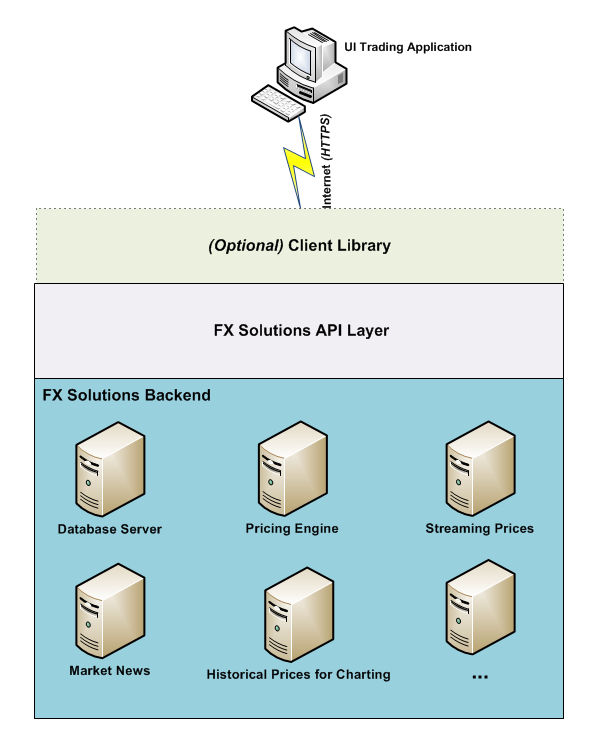
The FX Solutions Application Programming Interface (FXSAPI) enables you to connect with the FX Solutions trading backend using your client side user interface (UI) trading application. By offering the FXSAPI, users can create their own trading solution in order to trade their FX Solutions account.
The API supports trading your FX Solutions account with the full functionality available on the FX Solutions trading platform. For example, the API enables your UI application to perform the following transactions:
The API is compatible with any programming language that can communicate hypertext transport protocol (HTTP) web services commands and parse JavaScript object notation (JSON). For example, the C family of programming languages (C, C++ and C#), JavaScript, and Java.
Real time data streams require the use of the third party Lightstreamer client library version 3.6.
The FXSAPI is completely documented via the online package you are currently reading, located at the web address: http://docs.labs.fxsol.com/. The documentation is divided into two parts: a "Getting Started" and a "FXSAPI Reference" section.
This introduces you to the FXSAPI, describing the API architecture, provides sequence diagrams showing the workflow for various trading operations, illustrates the order lifecycle, and a section of notes on using the API. There is a glossary with explanations for commonly used trading and FXSAPI terminology.
This provides the specifications for all API methods and data types.
The FXSAPI is hosted on two FX Solutions environments: "Live" and "Pre-Production". Note: an account in one environment cannot be used in the other environment. The access URLs to the FXSAPI for the two environments are:
FXSAPI - https://ciapi.cityindex.com/tradingapi/
Live Prices Streaming - https://push.cityindex.com/
FXSAPI - https://ciapipreprod.cityindextest9.co.uk/TradingApi
Pre-Prod Prices Streaming - https://pushpreprod.cityindextest9.co.uk
The API communicates with the client UI application via secure hypertext transport protocol (HTTPS). There are two broad areas:
Request / response calls, initiated by the client UI application are handled by the HTTPS services. FXSAPI Services all follow a simplified REST like pattern supporting GET and POST, and encoding data in JSON.
Typically, requests for information such as: available markets, historical prices, and account history are exposed via HTTP GET requests. Requests that change state (placing a trade, logging on) are performed using HTTP POST.
Nearly all requests are authenticated by including a UserName and Session token in the headers or query string of the GET / POST (see the section on
Real-time data is delivered from the backend system through the use of long lived polling HTTP subscriptions to specific channels. The streams of real-time data that can be pushed to users are: prices, news headlines, client account margin, orders, and quotes. The streams are exposed using the Lightstreamer protocol, and require the use of the Lightstreamer client library version 5.1.1.
Long lived polling means that the data request rests on the server until an event is triggered, such as the arrival of data or a timeout occurring. Once an event is triggered, the request activates and sends a full response to the client.
All streams are authenticated using the same UserName and Session token used for a HTTPS service call.
Various adapters are provided to enable subscription to the streams. The streams are grouped into adapters as follows:
The online FXSAPI Reference Guide "Streams" tab provides stream and parameter information for the available channels. The Lightstreamer protocol (version 5.1.1) developer guide and full API reference can be found on the web site address http://www.lightstreamer.com/doc.
In order to receive streaming prices from the API, a few pre-requisites must be filled:
Important Note: the FXSAPI and streaming URLs cannot be mixed between the "Live" and "Pre-Prod" environments. For example, when using a "Pre-Prod" account, then both the FXSAPI and streaming URLs must be for "Pre-Prod".
The limit to the number of possible simultaneous connections is not per stream, but per Lightstreamer adapter (referred to as the target). Each adapter requires one HTTP connection, even if more than one stream is subscribed to from that adapter. An additional one control connection is always required.
As an example: to subscribe to the Prices, NewsHeadlines and Quotes streams, a total of 2 (adapter) + 1 (control) = 3 HTTP connections are required.
If you are creating a web browser based UI trading application, then the default setting for modern browsers (Internet Explorer 8.x and above, Firefox 3.x and above) allow a maximum of six persistent HTTP connections to a remote server. If required, advanced power users can change the configuration in the browser to allow more than six persistent HTTP connections.
In the case of Windows Phone 7 (WP7) based UI trading applications, this environment imposes a hard concurrent connection limit of six, which is not alterable.
The FXSAPI interaction process operates in an asynchronous event push manner, notifying your client UI application of the relevant events when they occur.
In order for the UI application to receive updates for relevant events, a subscription to the relevant event stream is required. After a subscription has been made, requests from the UI application result in a response. This can be followed by further events generating responses in an asynchronous manner due to the original request.
Subscriptions to event streams such as market prices can generate event responses without the UI application sending specific requests. These subscriptions are active for the session unless a specific unsubscribe request is sent, or until logout of the UI application.
A typical UI application could interact with the FXSAPI in the following manner:
Every request sent to the API must carry two pieces of authentication information:
This can be provided either in the headers of the request:
Request Method: GET
Request Headers:
Session:A-SESSION-TOKEN
UserName:A-USERNAME
Request URL: /news/?Category=UK
or in the query string (for clients that don't support headers):
Request Method:GET
Request URL:/news/?Category=UK&UserName=A-USERNAME&Session=A-SESSION-TOKEN
A Session token is created by submitting a UserName and Password to the LogOn v2 service method. This session token is guaranteed to be valid for at least 20 minutes, and should be used for all FXSAPI requests until the user closes the Trading UI application.
The UI application must be able to handle the Session token expiring, indicated by the return of a 401 HTTP status code. When a Session token expires, this means the user account is no longer logged in. One way to handle this is informing the user that they are no longer logged in (due to an expired Session token), and prompting the user to create a new Session token by re-entering their UserName and Password.
You can manually delete a Session token, or leave it to be automatically deleted.
The majority of the FXSAPI services require authentication. Please speak with your FX Solutions representative to obtain test environment credentials.
Note: the test environments are refreshed every few weeks. When that happens, you will need to request a new set of test credentials.
Datetime as UTC
All dates and times are always expressed as UTC and encoded in JSON as "/Date((1289231327280)/" where the numeric portion represents a JavaScript date in milliseconds since 1970-01-01.
Client UI application developers are not currently able to access the server side logs generated by the API.
The front-end UI application should have NO caching on the client side. Currently, all FXSAPI service requests return headers with:
Cache-Control:private
There is one exception to this rule, the messages lookup method. A 1 hour client cache time is recommended with the client libraries performing the appropriate caching.
The FXSAPI supports all the order types currently available on the FX Solutions trading system. These are:
Entry Stop Buy/Sell Orders
Entry Limit Buy/Sell Orders
Attached Stop Loss Orders
Attached Take Profit Orders
If/Done contingent Orders
One Cancels Other (OCO) Orders
See the "Glossary" for definitions of these order types.
The FXSAPI servers have been set to throttle requests from the client UI application, if more than 50 requests are sent over a 5 second window. When throttling is activated, a 503 HTTP status code is returned. In this case, the client UI application must wait 1 second before sending further API requests.
Two common cases that can trigger the throttling threshold are:
When requesting market information, the
Client UI applications should not calculate higher time frame prices from lower time frame data. For example, requesting 60 1-minute price data and then calculating a 1-hour data point. Instead, the client UI should request the 1-hour price history data from the server directly.